
You wake up with the best intentions: crush your to-do list, make progress on your goals, and maybe even find time to relax. But somehow, by the end of the day, you feel scattered, behind, and unsure where your time actually went.
Sound familiar?
You’re not alone—and you’re not doomed to live like this. The answer might be simpler than you think: Time Blocking.
In this post, you’ll learn exactly what time blocking is, how to use it to actually get things done, what tools can make it easier, and how to overcome the most common roadblocks.

Ready? Let’s go!
What Is Time Blocking
Time blocking is a time management method that involves scheduling your day into blocks of time—each dedicated to a specific task or activity.
Instead of keeping an endless to-do list and hoping you’ll “find time,” you intentionally assign tasks to time slots on your calendar.
This method is used by highly productive people like Elon Musk, Cal Newport (author of Deep Work), and countless entrepreneurs, students, and freelancers.
Think of it as budgeting—but for your time.
Tool suggestion: Full Focus Planner – a highly rated planner designed for daily time blocking.
Why Time Blocking Works (Backed by Science & Common Sense)
Time blocking isn’t just a trendy productivity hack; it’s grounded in psychological principles and supported by research. Here’s why this method can significantly enhance your productivity:
Learn more on this!

◍ Harnessing Parkinson’s Law
Parkinson’s Law states that “work expands to fill the time available for its completion.” This means that if you allocate more time to a task than necessary, you’re likely to use up all that time, often leading to procrastination or unnecessary complexity. By setting specific time blocks, you create a sense of urgency, encouraging more focused and efficient work. (Source: CheckifyMedium)
◍ Reducing Decision Fatigue
Every day, we make countless decisions, which can deplete our mental energy—a phenomenon known as decision fatigue. Time blocking mitigates this by pre-planning your tasks, reducing the number of decisions you need to make throughout the day. This conservation of mental resources allows for better focus and decision-making on important tasks. (Source: Lark)
◍ Combating the Illusion of Multitasking
While multitasking might seem efficient, research indicates it can reduce productivity by up to 40%. Our brains aren’t wired to handle multiple tasks simultaneously; instead, we switch between tasks, which can lead to errors and decreased efficiency. Time blocking promotes single-tasking, allowing you to devote full attention to one task at a time, thereby enhancing performance. (Source: Verywell Mind)
◍ Enhancing Focus and Flow
By dedicating specific time slots to particular tasks, time blocking helps eliminate distractions and fosters a state of flow—a mental state where you’re fully immersed and engaged in your work. This deep focus can lead to higher quality work and greater satisfaction.
◍ Increasing Accountability and Motivation
Having a structured schedule with designated time blocks creates a sense of accountability. Knowing that you have a set time to complete a task can motivate you to stay on track and avoid procrastination
To sum up:
- Parkinson’s Law: Work expands to fill the time available for its completion. Time blocking gives you boundaries.
- Reduces decision fatigue: You no longer need to decide “what to do next” all day long.
- Protects your focus: You carve out space for deep, meaningful work.
- Aligns with your natural energy: You can schedule high-focus tasks when you’re most alert, and admin work when you’re not.
By understanding and leveraging these principles, time blocking can transform the way you work, leading to increased productivity, reduced stress, and a greater sense of control over your time.
Tool suggestion: Focus To-Do: Pomodoro Timer & Task Manager – a great app to pair with time blocks for deep work sessions.
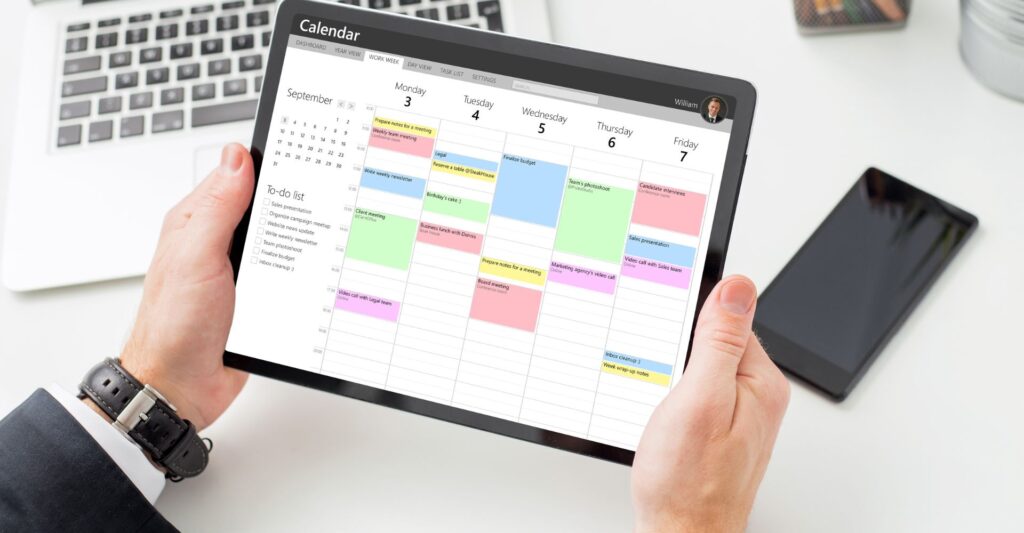
How to Use Time Blocking (Step-by-Step Guide)
Implementing time blocking isn’t complicated, but it does require a shift in how you think about your time. Here’s a step-by-step guide to get started—from evaluating how you spend your hours to creating a calendar you can actually stick to.
Let’s walk through how to start time blocking from scratch:
Step 1: Audit Your Time (Know Where It’s Going)
Before you can plan your ideal day, you need to understand how you’re currently spending your time.
Try this for 2–3 days:
- Write down everything you do in 30-minute increments.
- Be honest—scrolling Instagram counts.
- Use tools like Toggl Track or a printable time log.
Tools to try:
- Clockify (free time tracker)
- Paper audit sheet: Create or download a printable weekly tracker.
Pro tip: You’ll often find time leaks in areas like email, social media, or switching between tasks.
Step 2: Identify Your Priorities
Now that you’ve mapped your time, ask: What actually matters most right now?
Use this framework:
- Must-dos: work, meetings, deadlines
- Want-to-dos: hobbies, creative projects, health routines
- Need-to-dos: rest, exercise, self-care
Pick your Top 3 priorities for the upcoming week. These will become the non-negotiable blocks in your calendar.
You can use Notion or a paper journal to plan weekly goals before blocking time.
Step 3: Choose Your Time Blocking Tool
You have two main options:
Digital Calendars (great for flexibility & reminders):
- Google Calendar (with color coding)
- Motion (auto-schedules your tasks)
- Sunsama (integrates with task managers)
Paper Planners (great for visual thinkers & analog lovers):
- Full Focus Planner
- Panda Planner
- Bullet journals with DIY layouts
Step 4: Intentionally Block Out Your Day
Start with a blank day or week view and begin adding blocks.
Here’s how to structure it:
- Anchor Tasks – Fixed items like meetings or school drop-off.
- Deep Work – Creative, strategic, or demanding tasks that need focus.
- Admin Work – Emails, scheduling, small tasks.
- Breaks & Meals – Yes, you must block these too.
- Buffer Time – Leave 15–30 min gaps between blocks for overflows.
- Personal Life – Workouts, reading, family time, fun.
Example block name:
Instead of “Work” call it “Write blog outline for Time Blocking 101 post”
Pro tip: Use color-coding to easily scan task types:
- Red = Deep Work
- Blue = Meetings
- Green = Self-care
- Yellow = Admin
Step 5: Start Small (Then Scale)
Don’t try to block every second of every day on your first try.
Start with just 3–4 time blocks per day, for:
- 1 Deep Work task
- 1 Admin task
- 1 Personal/self-care activity
- 1 Buffer/flex period
As you gain confidence, layer in more structure.
Try: A Pomodoro timer like Focus Keeper to stay inside your blocks.
Step 6: Review, Reflect & Adjust Weekly
Time blocking isn’t “set it and forget it.” Each week, spend 10–15 minutes reviewing your calendar:
- What blocks worked?
- Which ones got ignored or skipped?
- What needs adjusting?
Make improvements and re-block next week with this new info.
Pro tip: Block time to do your weekly review! Sunday afternoon or Friday close-out time works great.
Realistic Example of a Time-Blocked Day
| Time | Task |
|---|---|
| 07:30 – 08:00 | Morning routine & coffee |
| 08:00 – 08:30 | Plan day & review goals |
| 08:30 – 10:30 | Deep work: Writing client report |
| 10:30 – 11:00 | Break & light walk |
| 11:00 – 12:00 | Admin & emails |
| 12:00 – 13:00 | Lunch |
| 13:00 – 15:00 | Creative project: Website update |
| 15:00 – 15:30 | Social media & content prep |
| 15:30 – 16:30 | Client meeting |
| 16:30 – 17:00 | Review & close day |
Notice how breaks, admin, and creative work are all blocked intentionally.

Common Challenges (And How to Deal With Them)
Time blocking can be a game-changer—but only if you treat it like a living system, not a rigid cage. Many people abandon time blocking after a few bumpy days, thinking it “just doesn’t work for them.”
The truth? It can work—you just need to know how to adjust when common roadblocks show up.
Let’s break them down and tackle them one by one.
Challenge #1: Constant Interruptions & Distractions
Whether it’s Slack notifications, coworkers, kids, or your own brain bouncing between thoughts—interruptions are productivity killers.
How to deal with it:
- Block off “deep work” time during hours when you’re least likely to be disturbed.
- Set boundaries: communicate with coworkers or family about your focus time.
- Mute notifications or use “Do Not Disturb” mode.
- Use noise-cancelling headphones or ambient focus music.
Tool suggestion: Loop Quiet Earplugs or Noise-Canceling Headphones
Challenge #2: Underestimating How Long Things Take
It’s easy to think you’ll write that blog post in 45 minutes… until it takes two hours.
How to deal with it:
- Track your time for 1–2 weeks to understand how long tasks actually take (use Toggl or Clockify).
- Always add buffer time (15–30 mins) between deep work blocks.
- Use the “1.5x Rule”: estimate the time, then multiply it by 1.5 to account for reality.
Useful tool idea: Timeular Tracker – physical tracker for time awareness.
Challenge #3: It Feels Too Rigid or Overwhelming
Many people abandon time blocking because they feel boxed in by it—especially creatives or people with ADHD.
How to deal with it:
- Start small: block 3–4 tasks a day, not your whole schedule.
- Include “flex time” or “overflow blocks” for spontaneity.
- Use broader labels like “creative work” or “client zone” if detailed scheduling stresses you out.
- Make it visual and fun with color coding or stickers in a paper planner.
Panda Planner – great for creative minds who need structure and flexibility.
Challenge #4: Guilt from Missed Blocks
You planned your day with intention… and then didn’t follow through. Now you feel behind and defeated.
How to deal with it:
- Shift your mindset: missed blocks aren’t failures—they’re data.
- Reflect: Why did it slip? Were you overbooked? Distracted? Tired?
- Adjust next time. That’s the real win.
- Keep a “success log” of blocks you did complete—celebrate progress.
“You don’t need a perfect day. You need a process that helps you recalibrate when things go wrong.”
Challenge #5: Unexpected Tasks Throw Off Your Whole Day
Life doesn’t always follow your calendar. Last-minute emails, urgent client requests, or family emergencies can derail everything.
How to deal with it:
- Create a daily “buffer block” (30–60 min) for handling the unexpected.
- Don’t overbook your day—leave 1–2 blocks completely empty if possible.
- Use time blocking for what you can control—and stay flexible with the rest.
Try tools like Motion that auto-reschedule missed tasks for you.
Challenge #6: “I Don’t Have Time to Plan My Time”
Ironically, many people feel they’re too busy to time block—especially freelancers and working parents juggling multiple roles.
How to deal with it:
- Set a recurring weekly time (Sunday night or Monday morning) to plan your week in 15–20 minutes.
- Try a hybrid approach: time block only your top 3 priorities each day.
- Use templates or pre-made layouts to reduce decision fatigue.
Freebie idea: Offer a Time Blocking Starter Kit with sample layouts and cheat sheets to make getting started easier.

Power Tips to Level Up Your Time Blocking
- Use color coding (e.g., red = meetings, blue = deep work, green = breaks).
- Batch similar tasks (e.g., email + calls = admin time).
- Sync your tasks with energy rhythms—do creative work during peak alertness.
- Leave 1–2 blocks each week for catch-up or overflow.
- End your day with a 5-minute planning session for tomorrow.
It’s Not About Perfection, It’s About Intention
Time blocking is not about filling every second of your day—it’s about choosing how you spend your most precious resource: your time.
Start small. Try it for one day. Then for a week.
Give yourself grace. Tweak your system. You’ll get better at it over time—and your productivity will thank you.
Have questions or your own time blocking hacks? Drop them in the comments!
This blog post is part of a series on how to work smarter, not harder. Check out Your New Productivity Playbook and get inspired!
Disclaimer: This post may contain affiliate links, which means I may earn a small commission if you choose to buy through them, at no extra cost to you.